
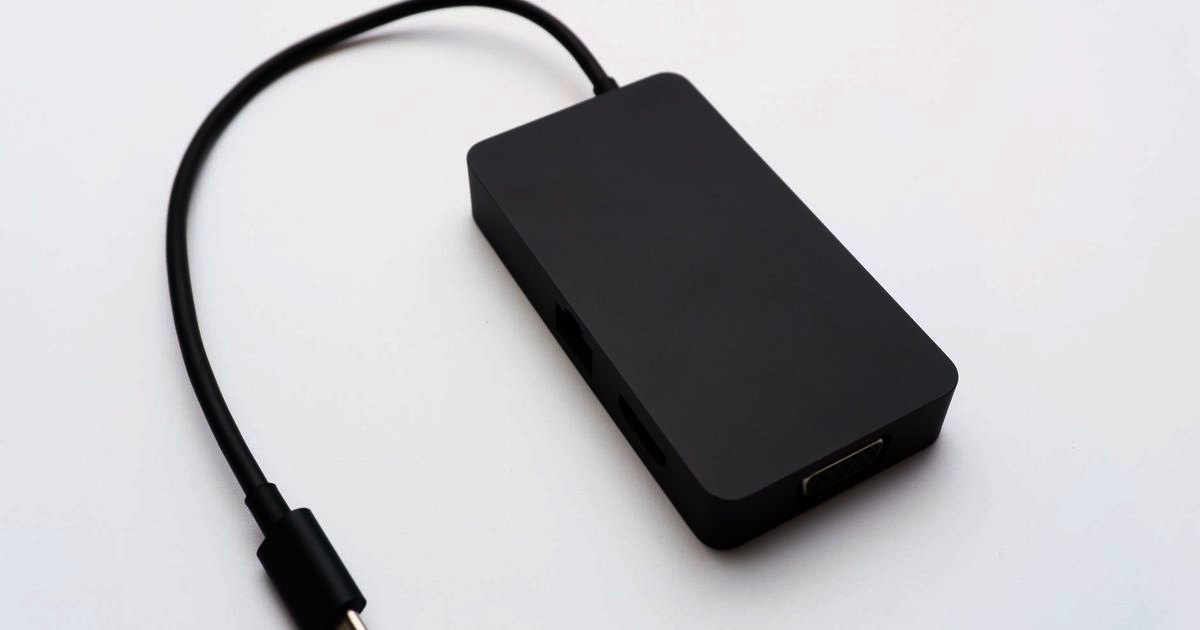
A USB-C Ethernet adapter gives a laptop, tablet or mini PC with no Ethernet port a wired connection through USB-C. The three picks below cover Gigabit, 2.5G and 5G. If you would rather add Ethernet and extra ports in one device, see our USB-C hub guide.
Top picks
1. UGREEN USB C to 2.5G Ethernet Adapter - Best Overall
SPP Score: 9.0 / 10 - 2.5Gbps wired Ethernet over a single USB-C connector. Our all-round pick.
Capability 8.9/10 - Versatility 8.0/10 - Build 8.5/10 - Value 8.9/10 - Fit 9.8/10
Fit for this guide: A wired connection is the whole job here, and 2.5Gbps over one USB-C to RJ45 adapter covers it.
Every pick here is scored out of 10: four marks rate the product and are the same in every guide, and the fifth rates its fit for this guide - how we test and score.
This adapter turns one USB-C port into a 2.5Gbps RJ45 connection. It does today's Gigabit-or-slower line and won't need replacing if your line later moves past Gigabit, which makes it the buy-once choice.
Pros
- ✓ 2.5Gbps over one USB-C port, more than double Gigabit
- ✓ Aluminium body, per the listing title
Cons
- ✗ The extra speed over Gigabit only shows on a line or home network that runs faster than Gigabit
- ✗ No pass-through charging, so a laptop with one USB-C port can't charge while it's wired
Who it's for: Anyone who wants a wired connection for a USB-C laptop.
Who it's not for: Owners of a one-port laptop who need to charge and stay wired at the same time.
2. Amazon Basics USB-C to Gigabit Ethernet Adapter - Best Budget
SPP Score: 8.6 / 10 - Gigabit Ethernet in a small aluminium dongle. Our value pick.
Capability 8.5/10 - Versatility 8.0/10 - Build 8.9/10 - Value 8.9/10 - Fit 8.9/10
Fit for this guide: Gigabit over a USB-C to RJ45 dongle answers the guide for anyone on ordinary UK broadband.
It does one job, USB-C in and wired Gigabit out, with nothing else to manage.
Pros
- ✓ Gigabit RJ45 from a single USB-C port
- ✓ Aluminium body, per Amazon's listing title
Cons
- ✗ Tops out at Gigabit, the lowest ceiling of the three
- ✗ Nothing beyond the one network socket: no USB-A, no video out
Who it's for: Anyone who wants a wired Gigabit connection and nothing more.
Who it's not for: Users who need card readers, extra USB ports or multi-gig speeds from one dongle.
3. UGREEN USB C to 5G Ethernet Adapter - Best Premium
SPP Score: 8.5 / 10 - 5Gbps wired Ethernet over USB-C. Our pick for maximum capability.
Capability 9.4/10 - Versatility 8.0/10 - Build 8.5/10 - Value 8.9/10 - Fit 8.0/10
Fit for this guide: 5Gbps wired speed fits a multi-gigabit line, which is a smaller share of readers than a plain adapter serves.
This UGREEN steps up to 5Gbps, and only the two cases in the speed section below get any use from the extra speed.
Pros
- ✓ 5Gbps, the highest wired ceiling of the three
Cons
- ✗ If anything in the chain stops at 2.5G, it's no quicker than the 2.5G pick
Who it's for: Laptop users who want the most wired throughput they can get.
Who it's not for: Anyone whose router tops out at Gigabit, where the extra speed has nowhere to go.
Quick verdict
For most people the UGREEN USB C to 2.5G Ethernet Adapter is the one to buy. The Amazon Basics USB-C to Gigabit Ethernet Adapter is the plain single-job dongle. Step up to the UGREEN USB C to 5G Ethernet Adapter only on a multi-gigabit line.
USB-C network adapter, Ethernet dongle or Ethernet adapter: is there a difference?
No. Retailers and manufacturers use all three names for the same thing: a small device with a USB-C plug on one end and an RJ45 Ethernet socket on the other. Whatever it's called, what separates one from another is the speed class, whether your operating system picks it up on its own, and how well it is built for a laptop bag. If a single-purpose dongle is not enough and you want HDMI and USB-A from the same port, our USB-C hub guide sorts hubs by how many ports you really need.
Gigabit, 2.5G or 5G: which speed do you actually need?
Match the adapter to the slowest link in your chain, not the fastest number on the box. Ofcom puts the average UK home download at 285 Mbit/s in 2025, up from 223 Mbit/s in 2024: well under Gigabit's 1000 Mbit/s. On a line like that a Gigabit adapter carries everything the line has, and a 2.5G or 5G model gains you nothing on downloads, although wired still beats Wi-Fi for stability on video calls and gaming. The faster classes earn their keep in two cases: a full-fibre multi-gigabit package, or moving large files between machines on your own network through a 2.5G router or switch. If you're not sure, check your router: if its LAN ports are labelled 1G or 10/100/1000, a Gigabit adapter is all it can use.
Ethernet to USB-C: how to connect it
- Plug the adapter into a USB-C port that supports data. Most laptop ports do, but some charge-only ports on docks and monitors will not recognise it.
- Run an Ethernet cable from the RJ45 socket on the adapter to a spare LAN port on your router, mesh node or switch. Any Cat5e or better cable handles Gigabit; Cat6 is the comfortable choice for 2.5G and above.
- Wait a few seconds. Current versions of Windows and macOS pick up most adapters on their own and switch to the wired connection; some chipsets prompt a quick driver download the first time.
- Turn Wi-Fi off while you are wired. Both systems prefer Ethernet when it is available, but switching Wi-Fi off stops the laptop hopping between the two.
- Run a speed test to confirm the wired link.
Will a USB-C Ethernet adapter work with my device?
- MacBook Air and MacBook Pro: yes, on the USB-C models.
- Windows laptops: yes, on any USB-C port that carries data.
- iPads with a USB-C port: yes, Apple lists USB to Ethernet adapters among the accessories the iPad's USB-C port supports; our USB-C Ethernet adapter for iPad guide covers the iPad-specific picks and the single-port catch.
- Steam Deck: yes, either directly or through a dock; for the dock route see the Steam Deck section of our USB-C hub guide.
- Android phones and tablets: many support it, but not every model does, so check yours before you buy.
- Chromebooks: yes, ChromeOS handles standard adapters automatically.
The one thing to check before buying is that the port you plan to use is a data port, not a charge-only one. If a USB-C port works with a flash drive, it is a data port.
How we chose
A single-purpose adapter keeps the checklist short: Ethernet speed class, the USB-C connection, and build, read from each maker's listing, then weighed against the line most UK homes actually have. The links open each adapter's live Amazon UK listing.
FAQ
Q: Will a 2.5G adapter work with my Gigabit router? A: Yes. UGREEN says its 2.5G adapter is "backward compatible with 1000/100/10Mbps", so it simply runs at Gigabit on a Gigabit router.
Q: Why is my USB-C Ethernet adapter slow? A: Check the chain. A router LAN port limited to 100Mbps, an old or damaged cable, or a USB-C port that only runs at USB 2.0 speeds will all cap your speed well below what the adapter itself can do. Our explainer on whether a USB-C Ethernet adapter slows your internet walks through the three ceilings, including the USB port limit, in detail.
Affiliate disclosure: This page contains affiliate links. As an Amazon Associate we earn from qualifying purchases, at no extra cost to you. See our disclosure page for details.