
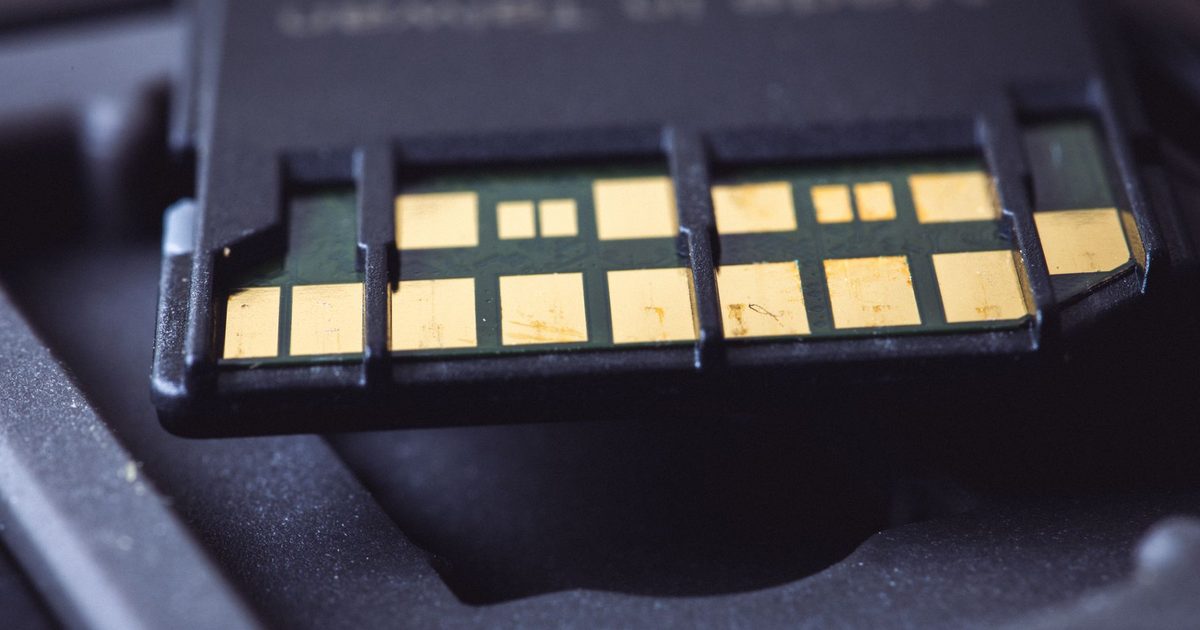
Turn the card over: the fastest way to tell them apart
You can spot a UHS-II card without reading a single spec: turn it over and look at the contacts. A UHS-I card has one row of gold pins along the bottom edge. A UHS-II card has that same row plus a second row of pins set just behind it. The SD Association describes that second row as a second lane for data, and it's where all of the extra speed lives. If a card has only one row of pins it is UHS-I, whatever the branding on the front says; if it has two, it can run at UHS-II speed in a reader and a device that also have the second row to talk to.
That physical difference is the whole story in miniature, because the second lane is hardware that both ends of the connection have to possess. Drop a UHS-II card into a plain UHS-I slot and its second row of pins simply sits unused, and the card behaves as an ordinary UHS-I one. Nothing breaks, but nothing speeds up either.
What the UHS number actually measures
UHS-I and UHS-II describe the card's bus, the channel it uses to move data, and the headline figure attached to each is a maximum rather than a promise. In its fastest mode, SDR104, the UHS-I bus tops out at 104MB/s, the SD Association says; the UHS-II bus reaches as high as 312MB/s in half duplex. Those are ceilings for how quickly the interface can shift data in ideal conditions, and in everyday use they tend to describe read speed far more than write speed. A card that reads near the top of its bus can still write much more slowly, which is why the bus number on its own never tells you whether a card can keep pace with a camera.
So the UHS mark answers one question: how wide is the pipe. It doesn't tell you the card's guaranteed write speed, and it's the write speed that decides whether video records cleanly. For that, you read a different set of markings entirely.
The other numbers on the card: speed classes
Look again at the card face and you will see a small U with a number inside it, or a V followed by a number, and often both. These are speed classes, and unlike the bus maximum they state a guaranteed minimum. The SD Association's UHS Speed Classes are U1 and U3, which assure a minimum write speed of 10MB/s and 30MB/s. Its Video Speed Classes run V6, V10, V30, V60 and V90, assuring 6, 10, 30, 60 and 90MB/s in turn. The point of a guaranteed floor is video: the Association's own explanation is that recording needs a constant minimum write speed to avoid dropping frames, so a camera shooting a demanding format looks for a card that will never dip below a set rate.
This is the number that trips people up, because a card can pair a fast bus with a modest class, or the reverse. A UHS-I card is commonly rated to U3 or V30, a guaranteed 30MB/s write, which covers a lot of everyday recording. The very top video classes are where the bus starts to matter: a class like V90 guarantees a 90MB/s write, which sits so close to the UHS-I ceiling of 104MB/s that in practice the fastest video-class cards tend to be UHS-II. If you are buying a card for demanding video, the V number is the one to match to your camera's stated requirement, not the bus maximum printed largest on the front.
Why a faster reader on its own changes nothing
Because the speed lives in the card and its lanes, every link in the chain has to be UHS-II before any of the extra speed shows up. The card, the reader and the port you plug into all need the second row of pins. Match two of the three and leave one at UHS-I and the whole transfer falls back to UHS-I speed, because the slowest part sets the ceiling. Buying a quicker reader for a drawer of ordinary UHS-I cards is the classic version of this mistake: nothing gets faster, because the cards were never the fast part.
Which reader to actually buy is its own decision, and it turns as much on what you plug into (a phone and an iPad have a single port, an older camera may still shoot CompactFlash) as on raw pace. Our USB-C SD card reader guide covers those picks, including the one UHS-II reader that is worth it when your cards can use it.
When UHS-II is worth paying for
Shoot long bursts of RAW frames and you want the buffer to clear and the card to copy quickly afterwards; record high-bitrate video and you need a high write-speed floor. Those are the cases where the wider bus and the higher guaranteed write earn their keep. For everything else, ordinary photos, casual 1080p clips, a card that lives in a phone or a dashcam, UHS-I is plenty, and the money does more as extra capacity than as bus speed the card will not use.
The one place the distinction bites even casual users is at the desk, when a card copy feels slow. By now the reason is clear: the card is the fast part or it is not, and no reader can push it beyond its own class, so that is where to look first. And if what you really want is one dongle that reads cards and drives a monitor and a wired network at the same time, that is a hub rather than a reader: our USB-C hub with an SD card reader guide covers those.
FAQ
Q: How can I tell if my SD card is UHS-I or UHS-II? A: Turn it over and count the rows of pins. A UHS-I card has a single row of contacts; a UHS-II card has a second row set behind the first, the extra data lane the SD Association's higher speeds rely on. It is the most reliable check, because the branding on the front does not always spell out the bus.
Q: What is the difference between the U number and the V number on a card? A: Both state a guaranteed minimum write speed, they just come from different eras of the standard. The SD Association's UHS Speed Classes are U1 (10MB/s) and U3 (30MB/s); the newer Video Speed Classes run V6 to V90, assuring 6 to 90MB/s. A card often shows both, and where they overlap they describe the same floor, so U3 and V30 are each a 30MB/s guarantee.
Q: Will a UHS-II card work in my UHS-I camera or reader? A: Yes. The two are designed to interoperate, so a UHS-II card works in UHS-I hardware, but it runs at UHS-I speed because there is no second row of pins at the other end for its extra lane to use. You lose nothing by using it, you just don't gain the wider bus until both ends are UHS-II.
Q: Do I actually need UHS-II? A: Only if you shoot long RAW bursts or high-bitrate video that needs a high write-speed floor. For everyday photos and ordinary clips a good UHS-I card rated to V30 is enough, and the spare money buys more capacity. If you are weighing up a reader to go with the card, our USB-C SD card reader guide walks through when the UHS-II pick is worth it.